#sql-server

Visual Studio Database Projects and the Problem With Reference Data (Part One)

·

·

4 min read

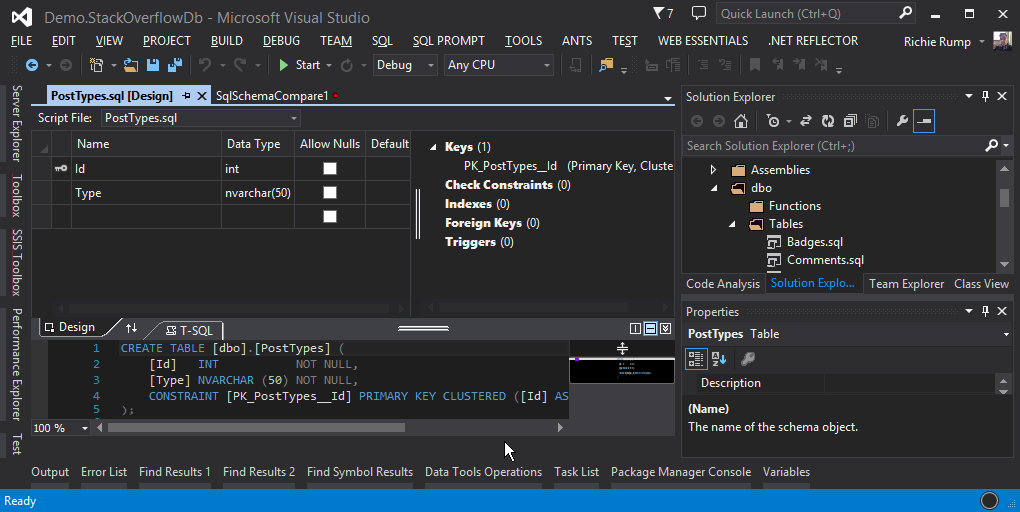
I’ll be honest. I wasn’t a fan of Visual Studio Database Projects. I still believe that designing databases using a data modeling tool like ER/Studio or ERwin is the very best way to build a database. But after taking a hard look at the Database Project project template I’ve changed my tune. There are some good things going on in Visual Studio Database Projects. It allows a database schema and scripts to be put into source control. For the DBAs reading this, if your database isn’t in source control it should be. The compare and update feature makes it easy to compare and update databases and the database project. The publish feature, although terrifying in a production environment, provides a mechanism to automatically deploy changes to a database without writing scripts or opening an instance of SSMS.

All of these things is good news for developers. As developers we should be using a local copy of the database for development and the Database Project makes it easy for developers to merge changes from other developers into a local copy. It’s still a bit manual since you have to hit the publish button to move changes, but this method is a whole lot better than using a central “dev” copy of the database. I’ve seen entire development teams halted for days because an update to the central development database broke a current code branch.

One of the challenges that I’ve seen when working with Visual Studio Database Projects is how to keep reference data consistent. Reference data is data that is known and remains fairly consistent. Think data in a type table. I’ve seen blog posts that suggest that reference data can be added with INSERT in a post-deployment script. But that’s not a great solution since once the INSERT has been published SQL Server will fail the statement when the publish is run again. A better way would be to use the MERGE statement in the post-deployment script. The MERGE statement allows data to be inserted, updated, or deleted all in one statement.

MERGE PostTypes AS target 
USING (
  VALUES (1, N'Question') ,
         (2, N'Answer') ,
         (3, N'Wiki') ,
         (4, N'TagWikiExerpt') ,
         (5, N'TagWiki') ,
         (6, N'ModeratorNomination') ,
         (7, N'WikiPlaceholder') ,
         (8, N'PrivilegeWiki')
) AS source ([Id], [Type])
ON (source.Id = target.Id)
WHEN MATCHED THEN
  UPDATE SET [Type] = source.Type
WHEN NOT MATCHED THEN
  INSERT ([Id], [Type])
  VALUES (source.Id, source.Type)
WHEN NOT MATCHED BY SOURCE 
    THEN DELETE;

There are some challenges with the MERGE statement solution. First of all, it’s complex. We’re smashing three different SQL statements into one so it’s going to be a bit messy. Secondly, we’re mingling data with the implementation. Because were using the VALUES argument the data is intertwined with the MERGE statement. It would be much better if the data was in a JSON object or XML file. This way the data would live on its own, independent of the SQL statement. Finally, we’re asking developers to write and maintain data in SQL. This isn’t horrible, but most devs that I’ve know don’t like SQL. It’s sad, I know. Look at the popularity of ORMs like Hibernate or Entity Framework, or the rise of tools like LINQ that can write SQL syntax; they point to devs writing less SQL not more.

What we need is a solution for reference data that:

  1. Keeps the developers from writing SQL.
  2. Has the data separated from the SQL implementation.
  3. Updates the data in source control automatically from the database.
  4. Is automatically deployed via the Database Project “Publish”.

That’s a tall order. But I have a solution that solves this problem…but you’re going to have to wait until the next blog post for that.

5 responses to “Visual Studio Database Projects and the Problem With Reference Data (Part One)”

  1. darrell tunnell Avatar
    darrell tunnell

    I’m listening!

    The typical problem with database projects is that they generate a diff to take the target database to the latest version, without any concept of applying migrations that need to occur form version to version. For example if you have version 1 in production for customer x, and version 2 in production for customer y, when you release version 3 of the database project to both customers, you now need a deployment script in the database project that can perform the data migrations necessary to go from version 1 to version 3 and another completely different deployment script that can perform the data migrations from version 2 to version 3. This isn’t helped by the fact that you can have only 1 deployment script but you can do various IF THEN logic to try and work out which scripts to run. Obviously the more different versions you have out in the field, and the more versions you release, the more migrations scripts that you have to create that can target an existing version and take it to the latest.The overhead of creating and maintaining such scripts becomes ridiculous. If however you only have 1 version deployed at a time – then this might be workable for you.

    Compare this with a migrations based approach. You would write a script to take the database from version 1 to version 2. You write another script to take the database from version 2 to version 3. The Migrations are run in sequence which means a version 1 database is first taken to version 2. A version 2 database is then taken to version 3. The advantage of this is that you are only ever having to maintain a script to take the database from the last version to the next version – and the same sequence of scripts are applied. Contrast this with a database project where it generates a script to take any version of the database to the latest, where such script may look different based on which database you are targeting, and where such a mechanism forces you to write hugely complicated migration scripts that try and work out what the current version is, and what needs to be done to the data using temp tables and all sorts.

    If you have a way of somehow tying in a nice migrations based approach into a database project deployment that would be very interesting. Otherwise, i’m still not sold over what the benefits of database projects really are – we can allready put sql scripts in source control without database projects. Just look at tools like DbUp! way simpler.

    1. Dave Avatar
      Dave

      You can achieve this by utilizing ‘Branching’ within your source control provider, that’s how we handle versioning and release for all our software development projects whether they be SQL database projects or any other type of software project.

  2. httpjunkie Avatar

    !!Updates the data in source control automatically from the database!!

    true…das wassup!

    One of the things I noticed when I first started to use git was that I had everything step by step from the beginning of my application to the end, except my database. I have since then been struggling to understand the right way to document the creation and iteration of my database (Aside form the code first model and it’s iteration) I have made it a point to look into this and for that reason I really like the article. Nice job!

    Also, I found this blog from researching the AFTK Podcast, Just listened to the episode with John Somnez. I pre-ordered his book and actually met him for the first time at our code camp in Orlando because we were both speaking. Also met Cecil there as well (2014) I really like the quality and digestible length of the show. Keep it up, we need another show that talks about dotnet but is also very relevant when it comes to newer technology. I’ll be listening to the first 5 episodes on a long drive tonight, can’t wait for more! Thanks!

    1. Richie Rump Avatar

      Thanks! I hope you enjoyed the show!

  3. SqlBarbarian Avatar

    Have you looked into readyroll? I’m really excited about it’s potential and will be posting soon on my progress on it as I’ve looked to migrate us into a better toolkit that soley SSDT

Leave a Reply

Your email address will not be published. Required fields are marked *

Richie Rump

// about the author

Richie Rump is a Dataveloper.

Richie Rump is a principal software engineer and software architect with more than two decades spent at the intersection of application code and the data layer. He builds and operates data-intensive products, including database diagnostic tools, cloud-native serverless platforms, and full-stack applications, owning them from architecture and database design all the way through to production. Beyond the day job, he created StatisticsParser.com, co-founded a user group, and co-hosted the Away From The Keyboard podcast. On this site, he writes about performance, database internals, and the engineering practices behind reliable systems.