
If you’ve ever heard the Away From the Keyboard, a podcast that I co-host with Cecil Phillip, you’ll quickly discover that I love hearing stories about how products are created. Now I get to tell you the story of how Paste The Plan became real and the architecture around it.
In a world…
Here at Brent Ozar Unlimited, Brent likes to meet with us individually on a monthly basis to review the company performance and our personal goals. During one of these meetings Brent causally mentioned that he wished there was a site that would make it simple to share query plans. So that got me thinking. I could whip up a site that could do just that, but the hard part would be displaying the query plan graphically. As it turns out that would be the easiest part because of Justin Pealing’s HTML Query Plan tool. This brilliant piece of code takes a query plan in XML and transforms it to HTML. Best of all, it’s open source.
With the graphical query plan piece settled, I started to figure out the architecture of Paste The Plan. I gravitated towards the traditional Microsoft stack: ASP.NET MVC, Entity Framework, and SQL Server, held together with C#. I presented this to Brent and his reply was “What if we put this in the cloud? More specifically, Amazon Web Services (AWS), and what if we went Serverless?” To quote one of the greatest movies ever made “That’s a horse of a different color.” It was an intriguing thought. But that would mean we would have to throw out the entire Microsoft stack with the exception of SQL Server. We’re a SQL Server shop. Of course we would use SQL Server…right?
So I got to work investigating. What is this “Serverless” thing and how does it works in AWS? As it turns out, “Serverless” actually runs on servers, but you aren’t managing them. Serverless really means that there are a group of managed services that your application runs on. This excites some folks and horrifies others. Count me in the excited category.
So let’s go over the Paste The Plan layer by layer.
Presentation Layer
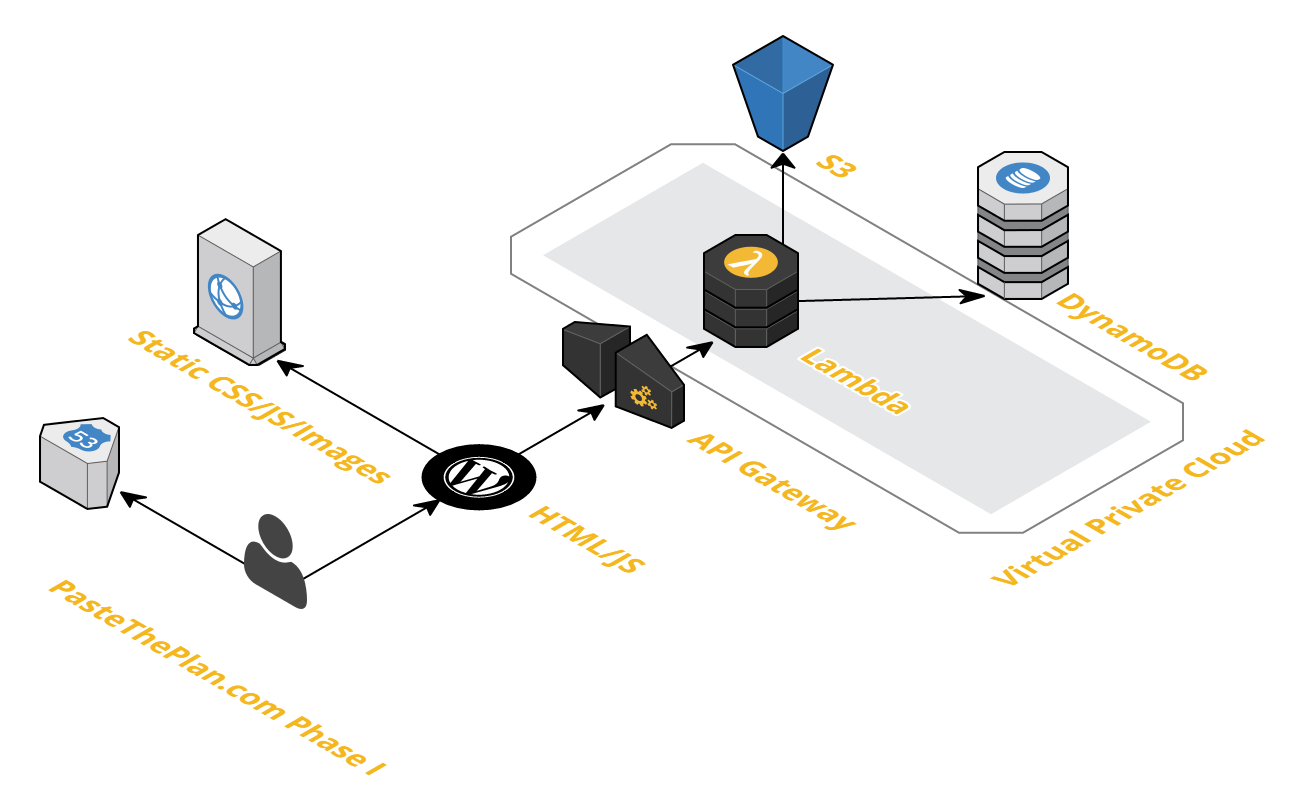
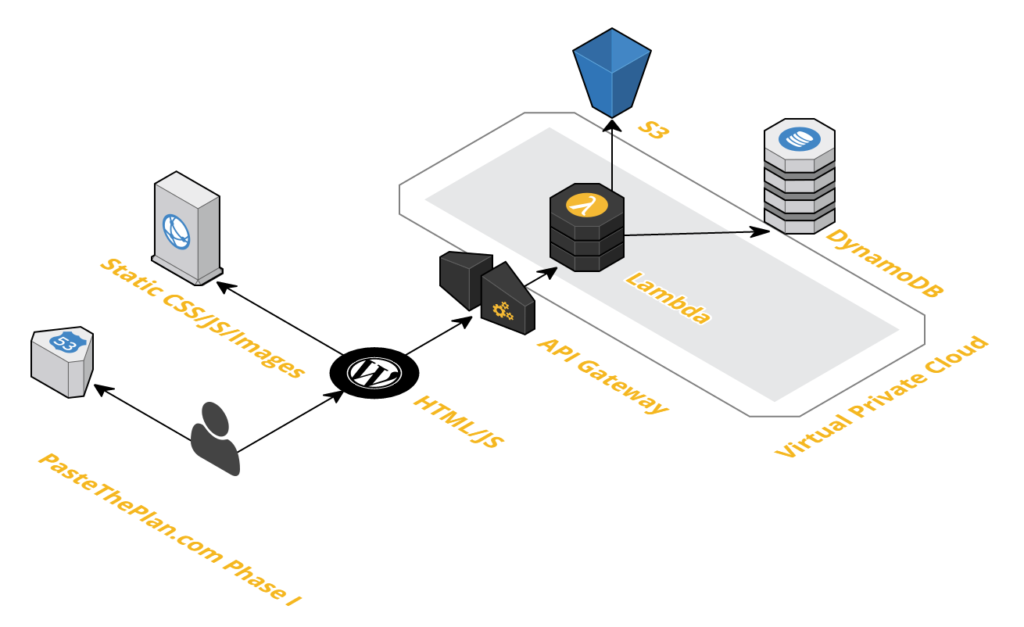
The presentation layer in a typical Serverless AWS web application is hosted in a S3 bucket that has static website hosting configured. That means we couldn’t use server-side web technologies like ASP.NET or PHP. Originally, I set up Paste The Plan this way but we wanted to integrate Paste The Plan with BrentOzar.com, which runs on WordPress, hosted by WPEngine. So a WordPress template was built so we didn’t have to deal with crazy iframes.
We also used CloudFront to house some of the other JavaScript, CSS, and image resources. Cloudfront is a content delivery network that puts static resources on servers all around the globe. So when a client tries to access content, Cloudfront delivers that content from the server that can deliver it the fastest.
Application Layer
The application layer is where all of the magic happens. When you press “submit” or view a query plan via a URL, the presentation layer calls the app layer to process that query plan or retrieve it from the data layer. In the AWS Serverless stack, you have only one choice for computational processing, Lambda. Lambda allows code to run in the cloud without having to worry about those pesky servers. Lambda is doing a bunch of our heavy lifting like parsing query plan XML, transforming XML to HTML, pulling SQL out of the XML, and saving data to the database. Just in case you’re curious, all of our code in Lambda was written with Node.js.
Now we have a problem — Lamba can’t directly communicate with the presentation layer. This is where the API Gateway comes in. API Gateway acts as the front door to Lambda and creates a RESTful API for the presentation layer. Now we have a fully fleshed out application layer that processes query plans and returns the output. All we need to do now is tie it all together with SQL Server right? Yea, about that…
Data Layer
Let’s take a look at the kind of data we need to store:
- Id (string)
- Date created (date)
- XML hash (string)
- Query plan XML (string)
- Query plan SQL (string)
- Query plan HTML (string).
At first glance this shouldn’t be a problem for SQL Server, but the query plan XML, SQL, and HTML strings could be large (we set the cap for the query plans at 2 MB). It’s not ideal, but we know SQL Server can handle it.
So here’s where the other side of working in the cloud comes in…cost. As of this posting (September 2016), the cost of the smallest reserved instance of SQL Server (db-t2-small, we don’t want Express edition) is $73.00 (USD) monthly. And that’s for the Web edition, not Standard edition. For Standard Edition the cost jumps to $623.42 monthly. So for an annual cost of $876.00 we could use SQL Server as the database for Paste The Plan.
But this is 2016, and there are alternatives in the cloud. AWS features a document/key-value database called DynamoDB. Take another look at what we’re trying to store: it’s not complex relational data, it’s just one table. DynamoDB seems like the perfect fit for the types of data Paste The Plan is going to generate. But what about the cost? I’m glad you asked. Amazon must have found an ancient rune stone that explained the formula for pricing NoSQL data hosting because it’s not simple. But let’s just say we needed 1,000,000 reads and 1,000,000 writes for Paste The Plan; that would cost us around $7.50 (USD) a month. Once a month, Brent is going to have to skip his daily Starbucks visit. (Brent says: bad news, Richie, it’s coming out of your paycheck.)
But storing all of that query plan text in DynamoDB didn’t sit well with me. Doing so would cost us more in reads, writes, throughput, and storage. That kind of text data doesn’t really belong in a database. It belongs in a file system. And wouldn’t you know it Amazon has a bang up file service in S3. So we decided to put the query plan XML, HTML, and S3 into a JSON object, compressed it, and put it in S3. But here’s the kicker, the cost of S3 is $0.04 (USD) per gigabyte.
It’s alive
So that’s how Paste The Plan was brought to life. We learned a bunch by bringing this little app to life. Working in the cloud is trickier than on-prem, with lots of little details to consider. Most everything in the cloud has a cost associated with it. Storage, data transfer, computation, and memory all need to be taken into account when building cloud-based applications. We hope you enjoy our little foray into the cloud.
This post was originally published on BrentOzar.com.

Leave a Reply