
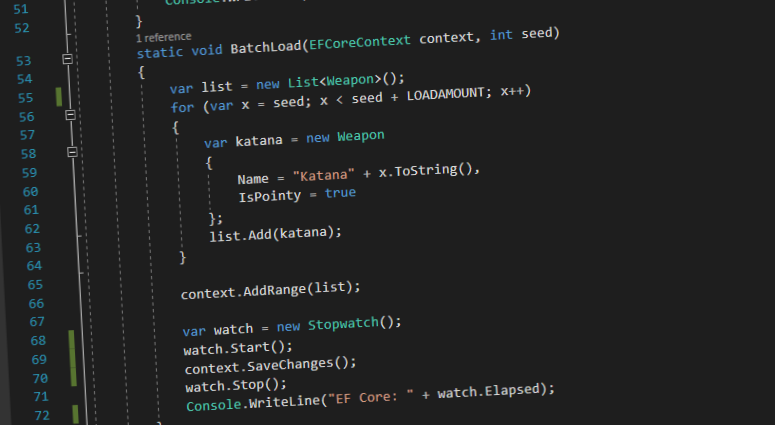
Recently, Julie Lerman contacted me about some strange SQL that Entity Framework Core (EF Core) was generating. Now, EF Core is fairly new and works with Microsoft’s newest framework .NET Core. I haven’t had a chance to get my hands on EF Core yet so I was excited to see what it was doing. And of course when I saw the SQL my jaw hit the floor. Here’s an example of the SQL she sent me to accomplish an insert:
exec sp_executesql N'SET NOCOUNT ON;
DECLARE @toInsert0 TABLE ([IsPointy] bit, [Name] varchar(250), [_Position] [int]);
INSERT INTO @toInsert0
VALUES (@p0, @p1, 0),
(@p2, @p3, 1),
(@p4, @p5, 2);

DECLARE @inserted0 TABLE ([WeaponId] int, [_Position] [int]);
MERGE [Weapons] USING @toInsert0 AS i ON 1=0
WHEN NOT MATCHED THEN
INSERT ([IsPointy], [Name])
VALUES (i.[IsPointy], i.[Name])
OUTPUT INSERTED.[WeaponId], i._Position
INTO @inserted0;

SELECT [t].[WeaponId] FROM [Weapons] t
INNER JOIN @inserted0 i ON ([t].[WeaponId] = [i].[WeaponId])
ORDER BY [i].[_Position];

',N'@p0 bit,@p1 varchar(250),@p2 bit,@p3 varchar(250),@p4 bit,@p5 varchar(250)',@p0=1,@p1='Katana',@p2=1,@p3='Kama',@p4=0,@p5='Tessen'If you’re an experienced SQL tuner, you’ll notice some issues with this statement. First off the query has not one but two table variables. It’s generally better to use temp tables because table variables don’t have good statistics by default. Secondly, the statement uses a MERGE statement. The MERGE statement has had more than it’s fair share of issues. See Aaron’s Bertrand’s post “Use Caution with SQL Server’s MERGE Statement” for more details on those issues.
But that got me wondering, why would the EF team use SQL features that perform so poorly? So I decided to take a closer look at the SQL statement. Just so you know the code that was used to generate the SQL saves three entities (Katana, Kama, and Tessen) to the database in batch. (Julie used a Samurai theme so I just continued with it.)
A Deeper Look
SET NOCOUNT ON;
DECLARE @toInsert0 TABLE ([IsPointy] bit, [Name] varchar(250), [_Position] [int]);The first part of the SQL creates a table variable called @toInsert0. This table variable will have the values that we want to insert into the Weapons table. It also adds a column called _Position, this will keep the order that the row was inserted in. This is needed later so that the WeaponId can returned in the order it was received.
INSERT INTO @toInsert0
VALUES (@p0, @p1, 0),
(@p2, @p3, 1),
(@p4, @p5, 2);The next bit is pretty straight forward. This inserts the data of the three entities into the @toInsert0 table variable. The @toInsert0 will be later used to insert the data into the Weapons table.
DECLARE @inserted0 TABLE ([WeaponId] int, [_Position] [int]);A second table variable, @inserted0, is created but this time with WeaponId and _Position as columns. This table will hold the new WeaponId’s that will be generated by inserting the data into the Weapon table.
MERGE [Weapons] USING @toInsert0 AS i ON 1=0
WHEN NOT MATCHED THEN
INSERT ([IsPointy], [Name])
VALUES (i.[IsPointy], i.[Name])
OUTPUT INSERTED.[WeaponId], i._Position
INTO @inserted0;This is where the magic happens. EF Core is using the MERGE statement to insert data from the first table variable (@toInsert0) into the Weapons table. The join that it is using is 1=0, which will always be false. So this statement will always run the WHEN NOT MATCHED section and insert the data into the Weapons table. Then, the OUTPUT line will put the newly created WeaponId and _Position into the @inserted0 table variable. This is necessary in order to return the newly created WeaponId to the client. In this case, WeaponId is an IDENTITY column which means SQL Server will automatically assign a value for WeaponId upon insert.
SELECT [t].[WeaponId] FROM [Weapons] t
INNER JOIN @inserted0 i ON ([t].[WeaponId] = [i].[WeaponId])
ORDER BY [i].[_Position];The final statement returns the newly created WeaponId(s) to Entity Framework. A few things to note: you could rewrite this statement to exclude the join and just select the data from the @inserted0 table variable, but I understand why they did it. What they’re doing is insuring that the data returning actually exists in the Weapons table. The other thing to note is the ORDER BY. In general, we want to avoid ORDER BY but the EF team needed to guarantee the order that was returned is the same order that was inputted so that the WeaponIds can be assigned to the correct weapon entity.
With a bit of testing, I realized that this statement wasn’t only being used for batch requests, but also for entity inserts with more than one entity being saved. Also, it appears that the limit per statement is 2,000 attributes. For example, if 6,500 attributes are being initially saved to the database EF Core will create four of these statements: three statements of 2,000 attributes and one statement of 500 attributes . The number of entities that are saved in each statement depends on the number of attributes being saved. In this case, 1,000 entities were saved per statement for a total of 3,250 entities saved to the database.
Rationalizing It All
Now that we’ve taken a look at the generated SQL, shouldn’t we be enraged? Wouldn’t we rip our devs a new one if we saw table variables, merge statements, and unnecessary sorts in their SQL? But let’s take a look at the core problem that the EF team is trying to solve: performance. Yea, I said it. In previous versions of Entity Framework, data was inserted one statement at a time. So if you needed to insert 5,000 rows into a table, you got 5,000 insert statements. This was necessary because the application needed the SQL-Server-generated identity value. But with this new approach, you could insert 5,000 rows of data with one statement.
But wouldn’t it be faster with temp tables? Sure! But you can’t guarantee a temp table name would be unique in your session (because you may have done other things along the way.) You could name a temp table with a guid, but there’s no guarantee that a guid is unique either. So the safest route would be a table variable and not a temp table.
But why use the MERGE statement if it’s so buggy? I think this goes back to the performance question. We could use n number of inserts but that’s not solving the performance problem that we originally had. In short, I think I’m OK with the MERGE statement. It’s only being used for inserts, and it’s faster than 5,000 insert statements.
But what about that ORDER BY in the SELECT statement? You kinda got me there. Could they be doing the sorting in the code but they went the SQL route. But it’s not so bad, since they’re creating a new SQL statement for every 2,000 entities SQL Server will only be sorting 2,000 rows.
To decide if it’s a bad thing, let’s compare the older version of Entity Framework (EF 6) with the new version (EF Core). In my totally unscientific tests, saving 10,000 entities to the database using the EF 6 took 4.06 seconds while saving the same 10,000 entities with EF Core took 1.46 seconds. So yes, the SQL isn’t perfect, but it’s 248% faster.
This post was originally published on BrentOzar.com.

Leave a Reply